SwarmCracker Documentation
Firecracker microVM orchestration with SwarmKit — no Docker, no Kubernetes required.
How Docs Are Organized
docs/
├── user/           # 👤 Running SwarmCracker — start here
│   ├── guides/     # Step-by-step guides
│   └── reference/  # CLI & config reference
├── dev/            # 🔧 Contributing & hacking
│   ├── reference/  # Package & API documentation
│   ├── testing/    # Test guides
│   └── architecture/ # Integration design
├── architecture/   # 🏗️ System architecture & diagrams
├── planning/       # 📋 Implementation plans & roadmap
└── research/       # 🔬 Research notes & archived docs
Quick Navigation
👤 For Users (Running SwarmCracker)
| You want to... | Go here |
|---|---|
| Install & set up | Configuration Guide |
| Deploy your first service | SwarmKit Guide |
| Manage VMs directly | CLI Reference |
| Set up networking | Networking Guide |
| Use snapshots | Snapshots Guide |
| Advanced usage | Advanced Guide |
| Security hardening | Security Guide |
| Disaster recovery | Disaster Recovery Guide |
| Jailer quickstart | Jailer Quickstart |
| Operations | Operations Guide |
🔧 For Developers (Contributing Code)
| You want to... | Go here |
|---|---|
| Contribute | Contributing Guide |
| Understand the API | API Reference |
| Learn the architecture | Architecture Overview |
| Run tests | Testing → README |
| Write E2E tests | Testing → E2E Tests |
| Follow code style | Conventions |
| Security review | Dev Security |
📋 Reference Docs
| Package | Reference |
|---|---|
| Config | Config Reference |
| Image | Image Reference |
| Lifecycle | Lifecycle Reference |
| Network | Network Reference |
| Storage | Storage Reference |
| SwarmKit | SwarmKit Reference |
Architecture
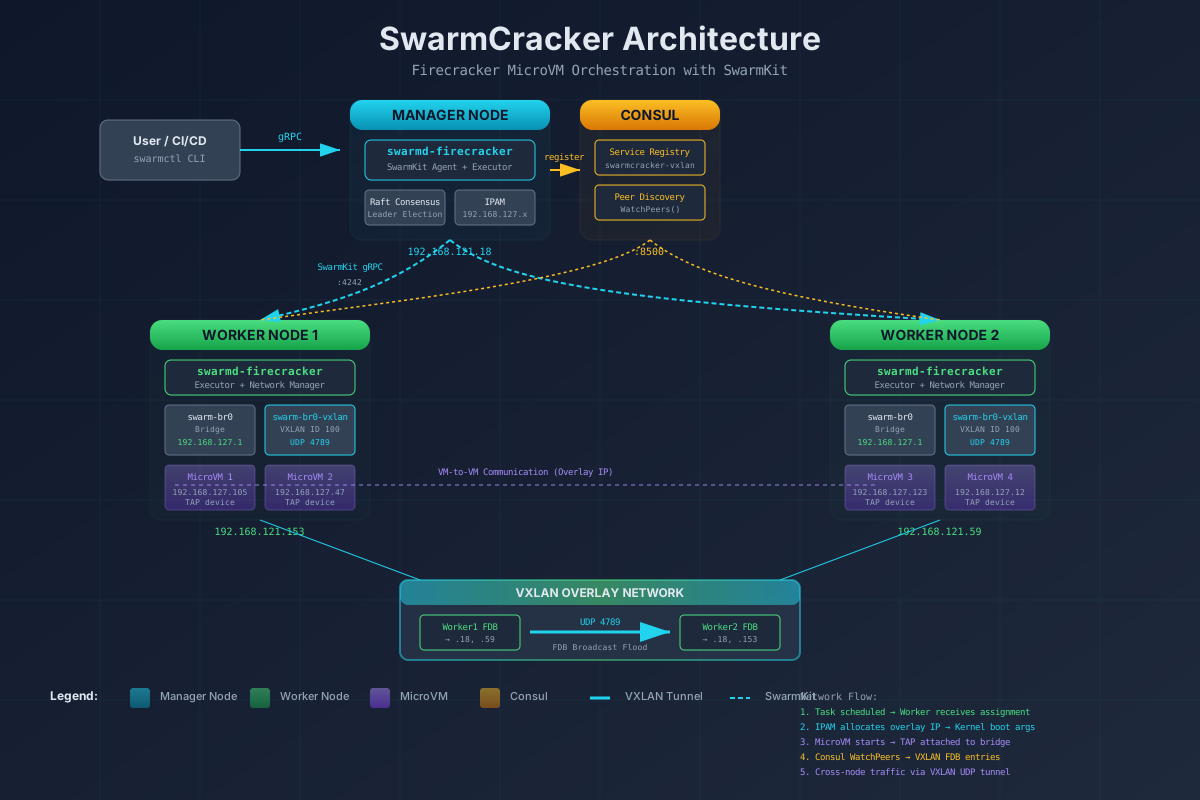
SwarmCracker transforms SwarmKit container tasks into Firecracker microVMs:
User → swarmcracker CLI → gRPC → swarmd-firecracker (manager)
                                        ↓
                                  SwarmKit orchestration
                                        ↓
                               swarmd-firecracker (worker)
                                        ↓
                            Executor → Firecracker microVM
                                        ↓
                              VXLAN overlay networking
📖 Full Architecture Overview
🖼️ Architecture Diagram (SVG)
Versions
| Component | Version |
|---|---|
| SwarmCracker | v0.9.2+ |
| Firecracker | v1.15.1 |
| SwarmKit | v2.1.1 |
| Go | 1.26 |
Useful Links
- GitHub Repo — source code, issues, PRs
- Firecracker Docs — the VM engine
- SwarmKit Docs — the orchestration layer
- Report a Bug
Last updated: 2026-06-26 | Doc version: 4.0